Scheduling tasks
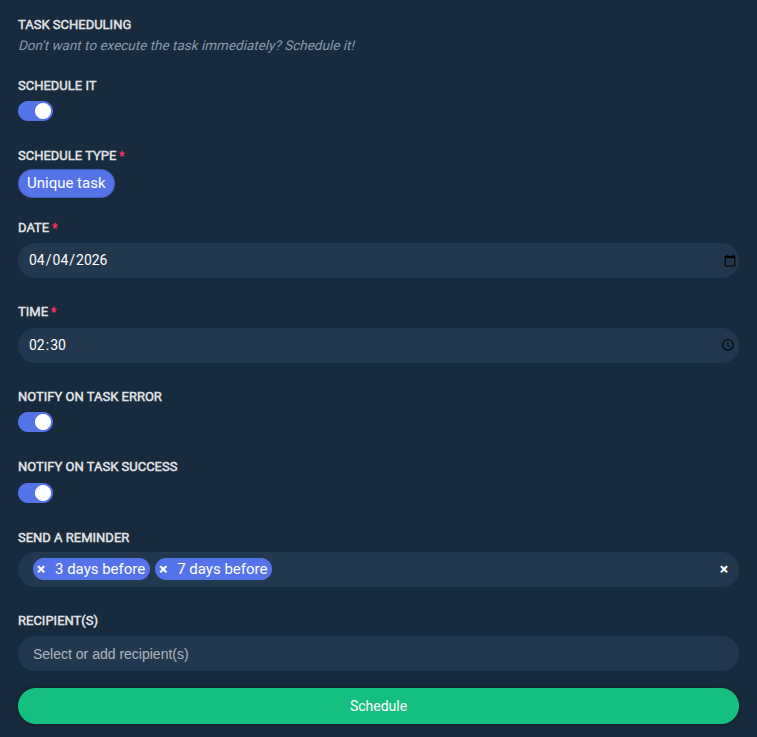
A scheduled task is essentially a normal task that is executed at a defined date and time instead of being executed immediately.
The task can either be a single unique task executed once at a defined date and time, or a recurring task executed at a defined frequency (hourly, daily, weekly, etc.).
New scheduled task
From the REPOSITORIES tab:
Step 1: Either create a new repository using the Create a new repository button, or select an existing repository and click the task you want to execute.
Step 2: Specify the task parameters, then enable the Schedule it switch to define the scheduling parameters.
Step 3: Click the Schedule button to confirm the schedule.
Disable a scheduled task
Scheduled tasks can be temporarily disabled without being totally cancelled.
From the TASKS tab:
Step 1: Select the task(s) you want to disable.
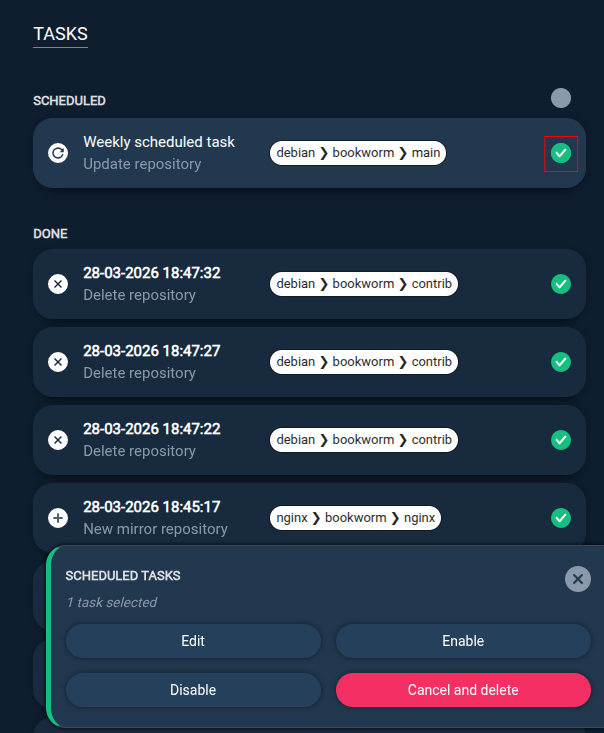
Step 2: Click the Disable button.
Cancel a scheduled task
Canceling a scheduled task will delete it and it will no longer be executed at the defined date and time.
From the TASKS tab:
Step 1: Select the task(s) you want to cancel.
Step 2: Click the Cancel and delete button.