Settings
Main configuration
| Parameter | Description |
|---|---|
HOSTNAME |
Repomanager FQDN, defined when pulling the Docker image. |
TIMEZONE |
Specify your timezone. This is especially useful to ensure that scheduled tasks run at the specified time. |
DEFAULT CONTACT |
Default contact for receiving emails. Currently, only scheduled tasks and their reminders send emails. You can specify multiple recipients. |
SESSION TIMEOUT |
User session timeout in seconds. After this time of inactivity, the user will be logged out and will have to log in again to access the web interface. |
USE A PROXY |
Specify the proxy URL to use to access the internet. e.g. https://myproxy.com:8080 |
LOGIN PAGE BANNER |
Add a banner on the login page (e.g. system use notification). |
Task execution
| Parameter | Description |
|---|---|
TASK QUEUING |
Enable or disable the task queuing. |
MAXIMUM NUMBER OF SIMULTANEOUS TASKS |
Maximum number of tasks that can run simultaneously. The other tasks will be queued. |
TASK EXECUTION MEMORY LIMIT (in MB) |
Set PHP memory limit for task execution. It is recommended to set this value to a higher value when syncing large repositories. |
Task cleanup
| Parameter | Description |
|---|---|
CLEAN TASKS OLDER THAN (in days) |
Tasks and their logs older than this value will be permanently deleted. This helps free up disk space. |
Repositories
Global settings
| Parameter | Description |
|---|---|
REPOSITORIES URL |
Root URL for accessing repositories. This URL is not browsable for security reasons. To explore the content of a repository snapshot, use the snapshot browsing system, see Browse repository content. |
DEDUPLICATION |
Enable or disable deduplication of packages in snapshots. When enabled, identical packages in snapshots will be stored only once, saving disk space. Default: enabled. Note: deduplication uses hard links. Disable this feature if your repositories are stored on a filesystem that does not support hard links (e.g. S3 buckets). |
RETENTION |
Maximum number of unused snapshots (snapshots not used by any environment) to keep per repository. Older unused snapshots are deleted after each task. Set to 0 to delete all unused snapshots. Can be overridden for each repository. Mirrors always keep at least one unused snapshot, see Snapshots retention. |
REPOSITORY CONFIGURATION FILE NAME PREFIX |
Prefix added to repository configuration files when installing on client hosts. Leave empty if you want no prefix. e.g. <myprefix>-almalinux-baseos.repo or <myprefix>-ubuntu-noble-main.list |
Global sync settings
| Parameter | Description |
|---|---|
PACKAGE DOWNLOAD TIMEOUT (in seconds) |
Maximum time allowed to download a package during a sync (curated repositories and mirrors). |
PACKAGE DOWNLOAD RETRIES |
Number of retries to download a package during a curated repository sync in case of failure. |
PACKAGE CHECKSUM MATCH FAILURE |
If a package checksum does not match the expected checksum, this parameter allows you to choose what to do in this case. |
Rpm
| Parameter | Description |
|---|---|
ENABLE RPM REPOSITORIES |
Enable RPM package repositories. |
SIGN PACKAGES WITH GPG |
Enable the signing of RPM packages when creating a RPM package repository (curated or local repository). Packages will be signed using the GPG signing key specified by the GPG KEY ID parameter. |
DEFAULT RELEASE VERSION |
Default release version to use when creating RPM repositories. |
DEFAULT PACKAGE ARCHITECTURE |
Default package architecture to use when creating RPM repositories. |
Rpm curated repositories settings
| Parameter | Description |
|---|---|
WHEN PACKAGE SIGNATURE IS MISSING |
A package retrieved from a remote repository may not be signed at all (for example, the publisher released the package forgetting to sign it). This parameter allows you to choose what to do in this case. |
WHEN PACKAGE SIGNATURE IS INVALID |
A package retrieved from a remote repository may have an invalid signature (because the GPG key used to sign the package was not imported, or because the publisher signed the package with a different GPG key, or because the package's signature is corrupted or somehow broken). This parameter allows you to choose what to do in this case. |
WHEN PACKAGE SIGNATURE FAILS |
A package retrieved from a remote repository may fail to be processed for signing (for example, the package is not a valid RPM package or it is corrupted). This parameter allows you to choose what to do in this case. |
Deb
| Parameter | Description |
|---|---|
ENABLE DEB REPOSITORIES |
Enable DEB package repositories. |
SIGN REPOSITORIES WITH GPG |
Enable the signing of DEB repositories when creating a DEB package repository (curated or local repository). The repository metadata will be signed using the GPG signing key specified by the GPG KEY ID parameter. |
DEFAULT PACKAGE ARCHITECTURE |
Default package architecture to use when creating DEB repositories. |
Deb curated repositories settings
| Parameter | Description |
|---|---|
ALLOW SYNC OF EMPTY REPOSITORIES |
Allow the sync of empty source repositories (repositories with empty Packages indices file). |
WHEN RELEASE FILE SIGNATURE IS INVALID |
The InRelease / Release file retrieved from a remote repository may have an invalid signature (because the GPG key used to sign the file was not imported, or because the publisher signed the file with a different GPG key, or because the file's signature is corrupted or somehow broken). This parameter allows you to choose what to do in this case. |
Gpg signing key
| Parameter | Description |
|---|---|
GPG KEY ID |
GPG key for signing packages and repositories, identified by its email address. This key is randomly generated upon Repomanager's first startup (4096 bits RSA key). |
It is currently not possible to modify the key Id or the passphrase on the fly from the web interface. To modify the key Id, you must do it manually with the following steps:
Step 1: Set a new key Id from the web interface respecting the format keyname@fqdn and Save.

Step 2: Enter the container.
Step 3: Delete pubring, macros file and the public key.
Step 4: Refresh Repomanager (F5) and test.
Be aware that packages and repositories signed with the old key will no longer be valid. You must re-sign them with the new key (rebuild repository metadata).
Environments
See Environments
Statistics
| Parameter | Description |
|---|---|
ENABLE REPOSITORIES STATISTICS |
Enable logging and statistics on repositories access. |
Scheduled tasks
| Parameter | Description |
|---|---|
ENABLE SCHEDULED TASKS REMINDERS |
Enable reminders for scheduled tasks. Reminders are sent via email to the recipients defined when adding a new scheduled task. |
Hosts
| Parameter | Description |
|---|---|
MANAGE HOSTS |
Enable the management of client hosts. These hosts can register to Repomanager using linupdate. See Hosts |
SSO
SSO was introduced in version 4.19.0
SSO was tested against the following Identity Providers (IdP):
- Okta (Workforce Identity Cloud, Developer Edition)
- Authentik (Open Source)
- Microsoft EntraID / Azure AD
SSO can be configured:
- With an administrator account in the web-UI (settings page)
- With the
app.yamlfile located in the root of therepomanager-datavolume of the container
Info
The app.yaml content will override the web-UI settings if both are set.
| Parameter | Description |
|---|---|
ENABLE SSO |
Enable SSO login via OpenID Connect. |
SSO ONLY |
Only allow login via OpenID Connect. This will disable local login. |
PROVIDER URL |
Provider URL, used for Autodiscovery. |
AUTHORIZATION ENDPOINT |
Override Authorization Endpoint (leave empty for Autodiscovery). |
TOKEN ENDPOINT |
Override Token Endpoint (leave empty for Autodiscovery). |
USERINFO ENDPOINT |
Override Userinfo Endpoint (leave empty for Autodiscovery). |
SCOPES |
Additional OIDC Scopes (openid already present). |
CLIENT ID |
Client ID. |
CLIENT SECRET |
Client secret. |
USERNAME CLAIM |
OIDC Claim for username. |
FIRST NAME |
OIDC Claim for First Name. |
LAST NAME |
OIDC Claim for Last Name. |
EMAIL |
OIDC Claim for Email. |
GROUPS |
OIDC Claim for Groups / Roles. |
GROUP ADMINISTRATOR |
Groups value for Administrator. |
HTTP PROXY |
HTTP proxy. |
CERTIFICATE FILE |
Path to certificate file. The certificate file must be stored under Repomanager's data directory to be valid. |
Example with Okta
| Setting | Value |
|---|---|
| provider_url | https://dev-0000000.okta.com/ |
| client_id | (client id) |
| client_secret | (client secret) |
Example with Authentik
| Setting | Value |
|---|---|
| provider_url | http://server:9000/application/o/repomanager/ |
| authorization_endpoint | http://localhost:9000/application/o/authorize/ |
| client_id | (client id) |
| client_secret | (client secret) |
Users
Create a user
You must be logged in as an administrator account to create a new user.
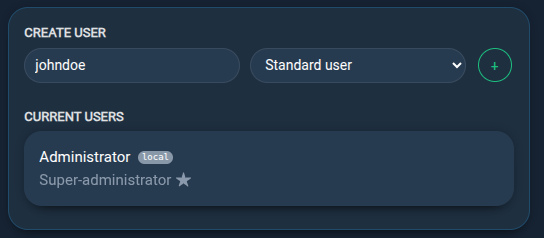
From the SETTINGS tab and the USERS section:
Step 1: Specify a username and a role for the user.
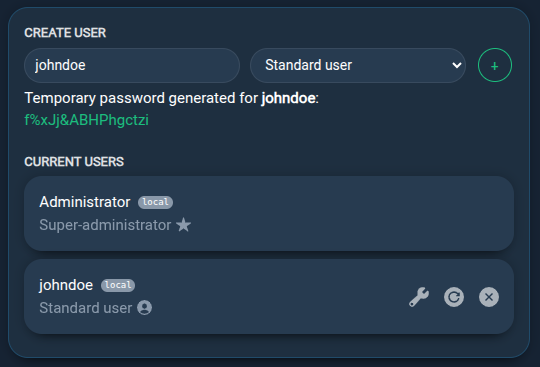
Step 2: A new random password is generated and the user is ready to use.
Notes
- The
Standard userrole has limited permissions which can be configured by administrators. - The
Administratorrole has full permissions. It can create or delete any data. It cannot delete other administrators.
Reset user password
You must be logged in as an administrator account to reset another user password.
From the SETTINGS tab and the USERS section:
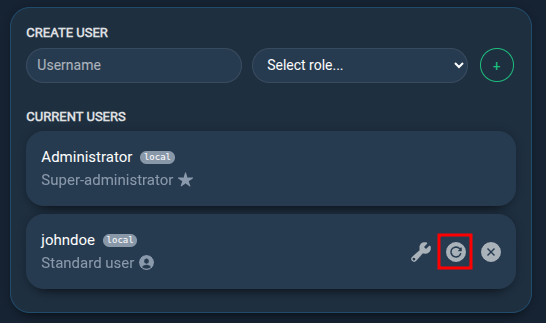
Step 1: Use the Update icon to reset user password.
A new random password will be generated.
Edit user permissions
You can edit Standard users permissions to allow them to perform specific actions or access specific data. For example, you can allow a standard user to create new repository snapshots but not to delete them, or to access only specific repositories.
You must be logged in as an administrator account to edit another user permissions.
From the SETTINGS tab and the USERS section:
Step 1: Use the Edit permissions icon to edit user permissions.
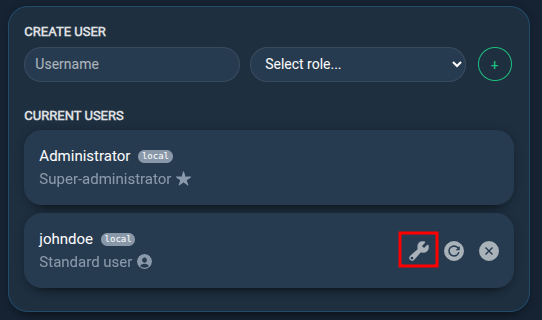
Step 2: Select the permissions to allow the user to perform specific actions and save.
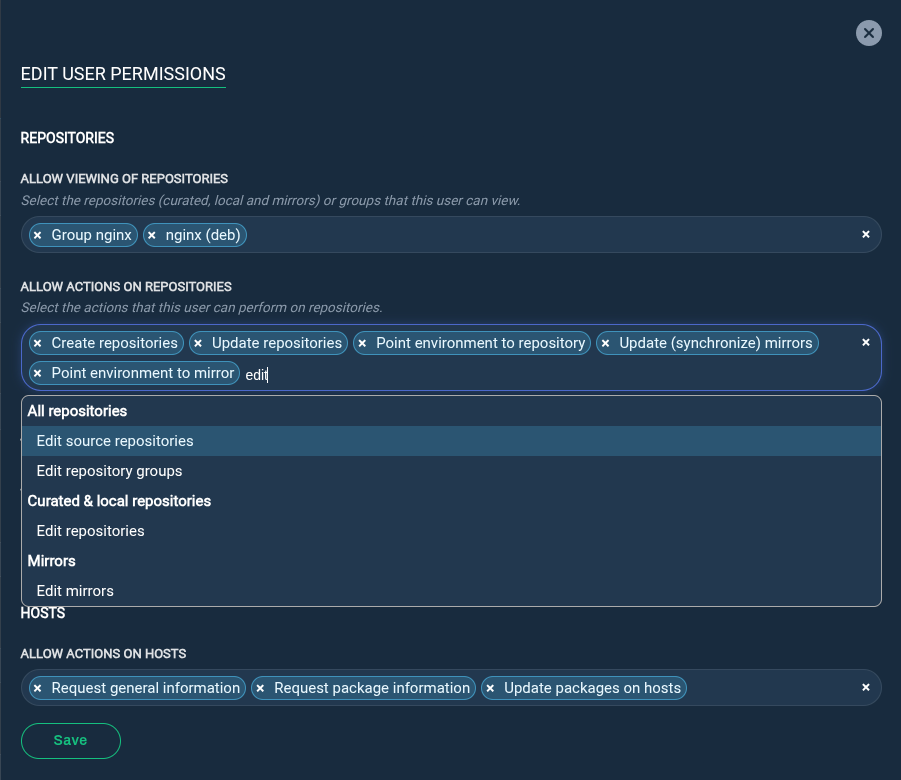
Step 3: Save.
Repositories and mirrors permissions
- Viewing: viewing permissions apply to all repository types (curated, local and mirrors). A user can view a repository if they can view all repositories, if they can view the group the repository is member of (or the
Defaultgroup if it is not member of any group), or if the repository is granted individually (Curated & local repositoriessection of the permissions selector for curated and local repositories,Mirrorssection for mirrors). - Actions: the actions selector is split by repository type. Actions of the
All repositoriessection (source repositories and groups edition) apply to all repository types, as source repositories and groups are shared. Actions of theCurated & local repositoriessection apply to curated and local repositories only, and actions of theMirrorssection apply to mirrors only. - Scheduled tasks on a dynamic target (all repositories, a group, tags): the
UpdateandPoint environmentactions also apply to the mirrors matching the target, so the user must be allowed to perform the action on both repositories and mirrors.
Hosts registering permission
The Register hosts (API key) permission allows the user's API key to register new hosts (e.g. with linupdate). It is required for standard users, other hosts permissions do not allow registering hosts. Administrators do not need it.
Login protection
Local accounts are protected against brute force attacks: when 10 failed login attempts have been made for the same username from the same IP address within the last 15 minutes, further logins with this username are refused from this IP address (refused attempts are also counted as failed attempts). SSO accounts are not concerned.
Behind a reverse proxy
The IP address taken into account is the one connecting to the Repomanager container. Behind a reverse proxy, this is the IP address of the reverse proxy: the failed attempts of all clients are then counted together, and anyone able to reach the login page can temporarily block the login of a local account (including administrator accounts) by sending failed attempts with its username. Consider restricting access to the Repomanager web interface to trusted networks on your reverse proxy.